For commercial printers

The modern letter shop is here.

The smart solution to make direct mail automated and more profitable.

INPUT Recipient list CSV · SFTP · API DirectMail.io CRM HYGIENE Dedupe & Suppress DMA, deceased, prison NCOA 48-month move-update CASS Standardize · ZIP+4 · DPV ROUTING OPTIONS Pre-sort Local Entry Pre-sort Dropship Co-mingle DECISION Web-to-print Variable data · imaging · proofing Composition stage Eliminated by DirectMail.io REMOVED Print-ready PDF Data and art already merged RIDE-ALONG TRACKING Informed Delivery Inbox preview to recipient Informed Visibility Scan-event tracking to you
Letter Shop

A complete letter shop, inside your print shop.

Postal compliance, sortation, and Informed Delivery — all native, all in-platform. Plus a PDF-driven web-to-print workflow that eliminates the composition stage.

01 Postal stack

  • NCOA USPS-certified change-of-address update on every drop.
  • CASS USPS-certified address standardization. ZIP+4 and DPV.
  • Pre-sort Local Entry Automation discounts at origin, every job.
  • Pre-sort Dropship Pre-sorted freight to regional USPS facilities. Lowest-rate postage.
  • Co-mingle Pool with other jobs to hit automation thresholds on small runs.
  • Informed Delivery Mail piece in the email preview. 63.9% open rate.
  • Informed Visibility Per-piece IMb tracking through the mail stream.
02 Web-to-Print

  • In-browser editor Design in-platform. No Adobe. No outside software.
  • Variable data + imaging 1:1 personalization baked into every record.
  • Composition eliminated Data and art merged in-platform, not at the bench.
  • Print-ready PDF output Jobs leave our system ready for imposition.
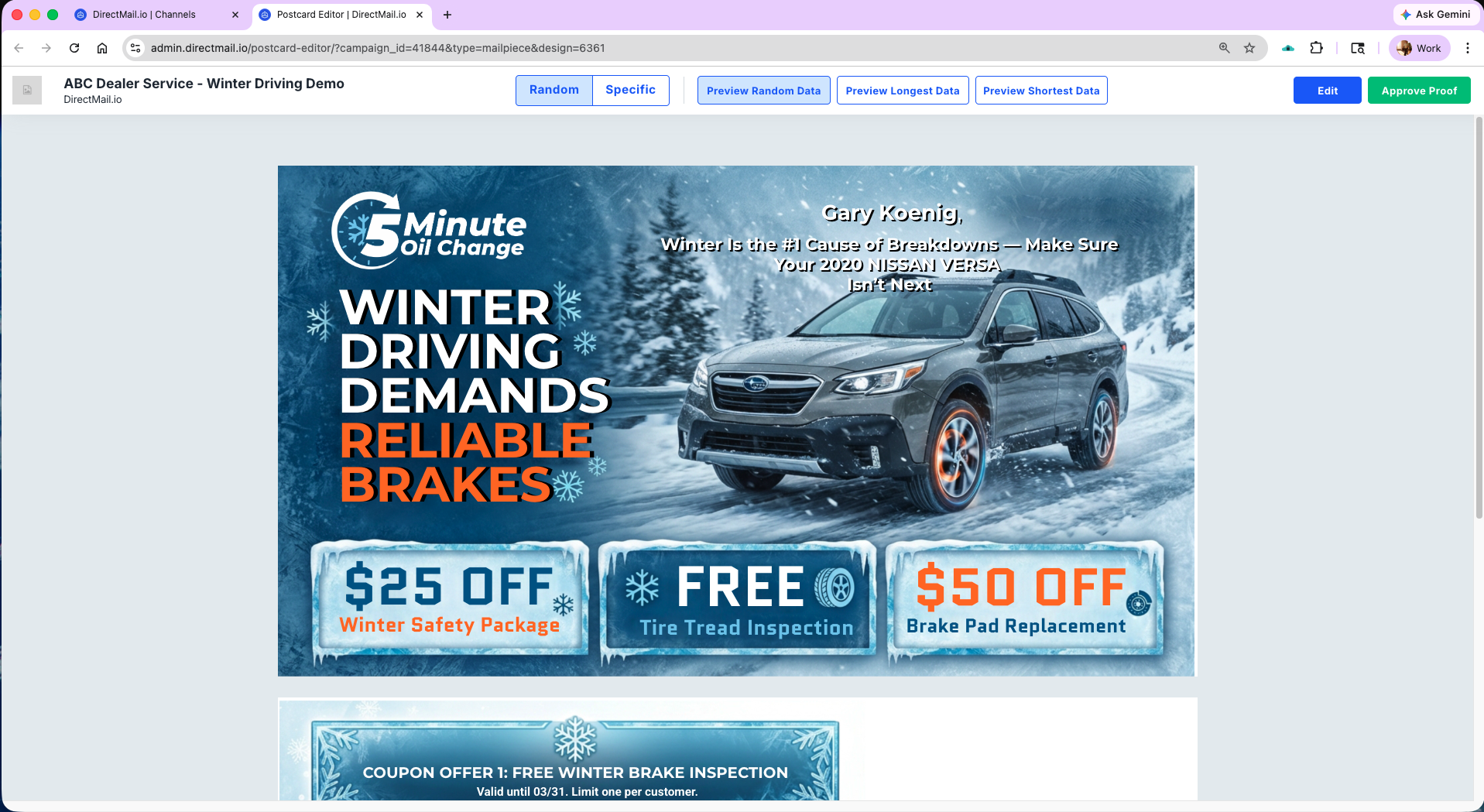
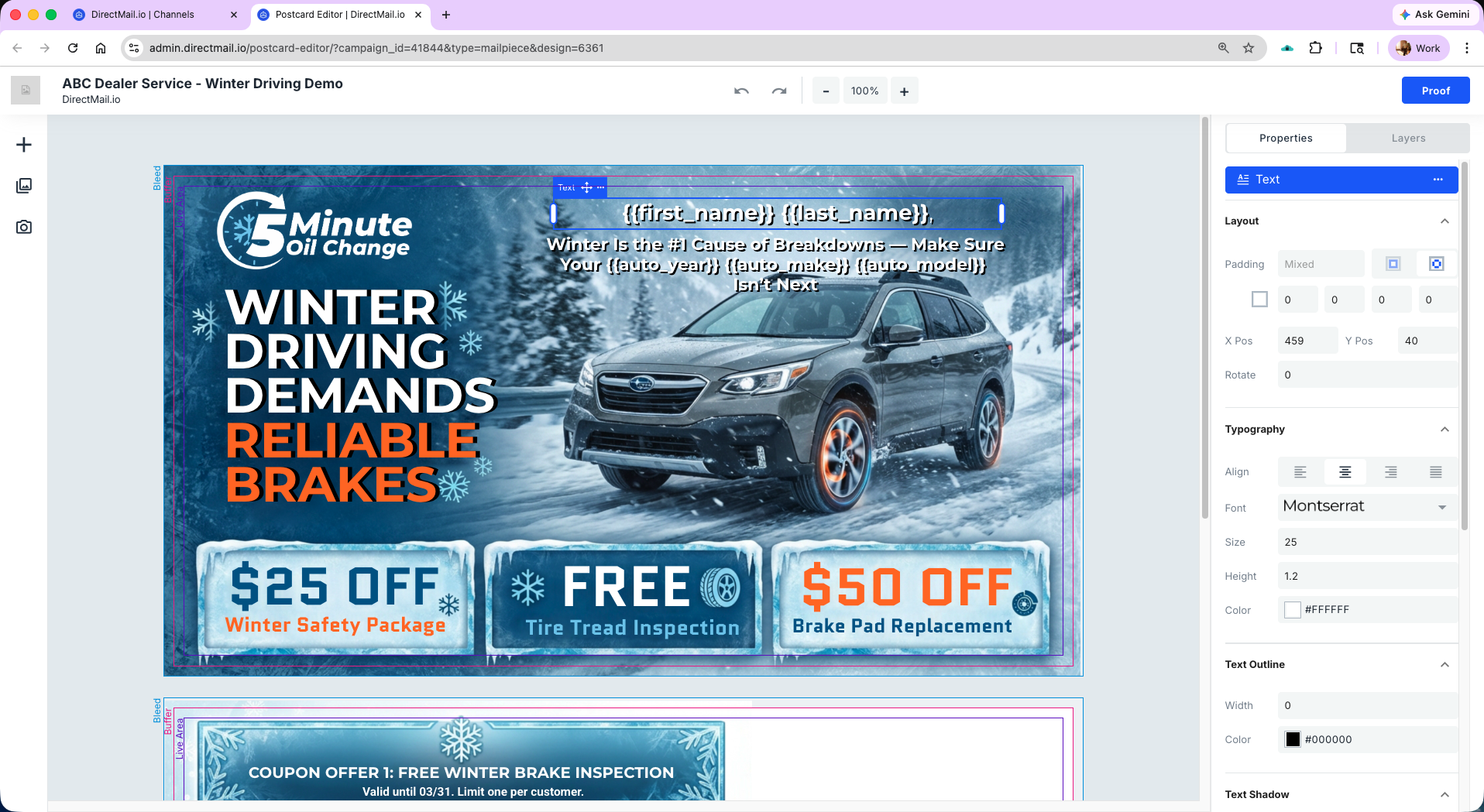
The in-browser editor. Design, variable data, variable imaging — in one place. Out comes a print-ready PDF.
Proof view. Every record renders 1:1 before the job ships — data and art merged in-platform.
Data & Automation

Clean lists. Triggered campaigns. No separate vendors.

Every data tool and campaign trigger your team needs — native, not integrated. Use DirectMail.io as the CRM, or pipe into yours via API.

01 Data

  • Email + address appends Turn a partial list into a mailable or multi-channel one.
  • Email + address hygiene Validate, correct, flag. Before you print.
  • List procurement Consumer, B2B, new-mover, automotive — built in.
  • Dedupe Household and individual-level match.
  • Suppression Global and per-job suppression lists.

02 Automation

  • USPS scan triggers Email or SMS auto-fired on the actual USPS last scan.
  • New-mover triggers Mail within days of a new address on file.
  • Birthday + event triggers Recurring sends based on CRM events.
  • Drip sequences Multi-touch sequences across channels.
  • Anonymous visitor ID Identify web traffic and trigger mail to high-intent visitors.
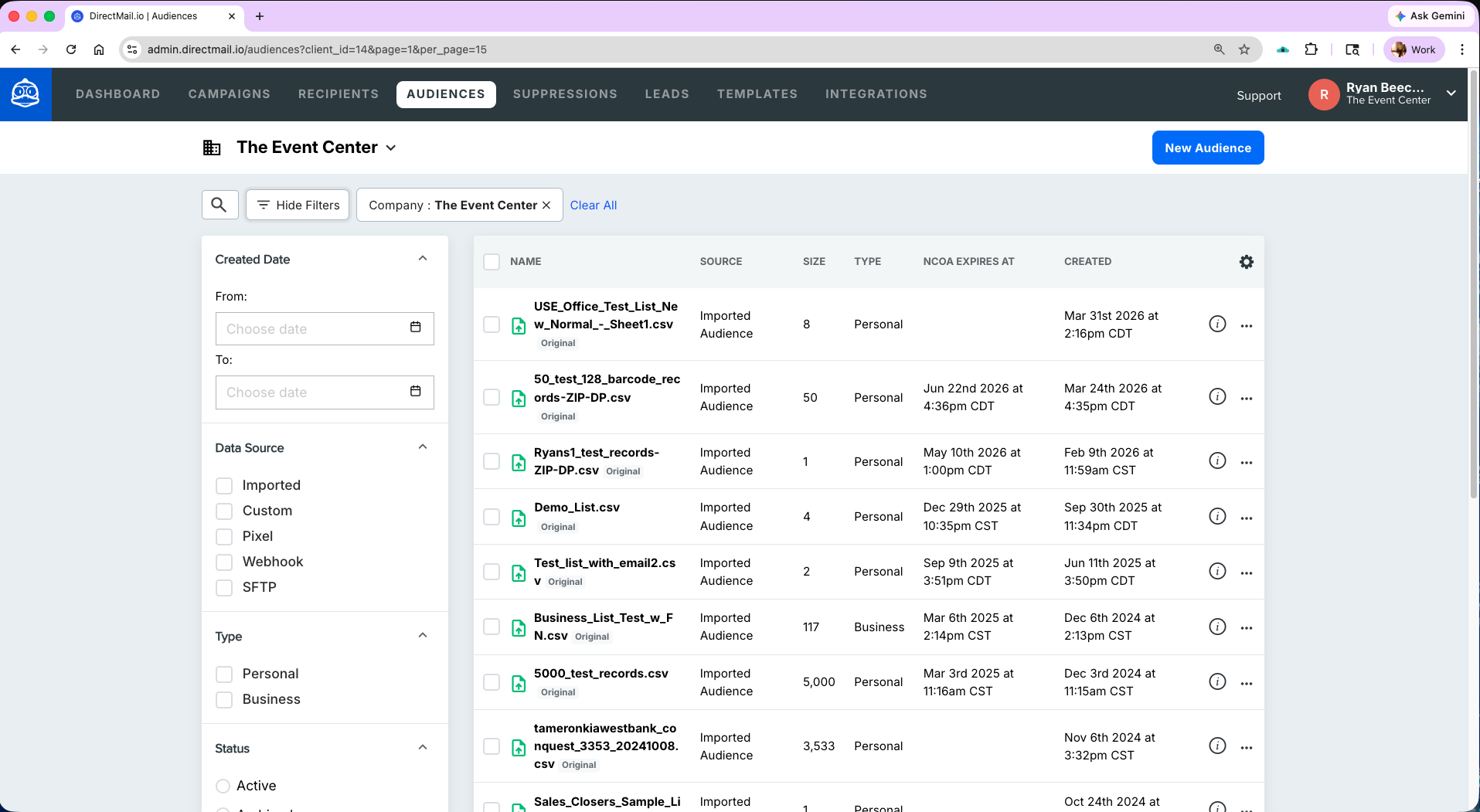
Every list tracked — source, type, size, NCOA expiration. The hygiene work your shop would otherwise do by hand.
Omni-channel

Optimize campaign performance — add digital and social to the mail.

Mail is the anchor. Email, SMS, social, and retargeting wrap around it — same list, same triggers, same dashboard. Set it up once; the platform runs the sequence on every drop after that.

  1. 01 7 days before drop

    Digital + social prime

    The same mailing list pushed to Meta and display retargeting. The audience sees your client's brand before the mail lands.

    Meta · Display · Retargeting
  2. 02 Day of USPS last scan

    Email auto-fires

    The real USPS scan event triggers email and SMS. Inbox, text, and mailbox co-land the same day — a sequence digital-only stacks cannot replicate.

    USPS scan → Email · SMS
  3. 03 Morning of delivery

    Informed Delivery preview

    USPS emails recipients a digest with a grayscale image of the mail piece arriving that day. 63.9% open rate. Native USPS channel, no opt-in needed.

    USPS · Email preview
  4. 04 Mail lands

    Physical piece arrives

    Informed Visibility confirms the mail-stream delivery per piece in the dashboard. Dynamic QR scans and landing-page hits flow in live.

    Mail · IV · Dashboard
  5. 05 Days after

    Follow-up sequence

    Dynamic QR scans, landing-page hits, and call tracking flow into the dashboard. Retargeting hits non-responders. Attribution per channel, per piece, per client.

    QR · Calls · Retarget
Tracking

Track every touch, every piece, every dollar.

Dynamic QR per recipient. Multi-lingual landing pages. Call tracking. ROI attribution. Informed Visibility on every mail piece — in one dashboard.

  • 01

    Dynamic QR codes

    Unique per recipient. Every scan tied back to the record.

  • 02

    Multi-lingual landing pages

    Variable-data pages that render in the recipient's language.

  • 03

    Call tracking

    Know exactly which mail piece drove the call.

  • 04

    ROI + attribution

    Revenue, response, and cost-per tied to every drop.

  • 05

    Mail tracking

    Informed Visibility on every mail piece — in the same dashboard.

Printer FAQ

Questions printers ask first.

If your question isn't here, book a demo — we'll answer it on your shop's actual workflow.

  • What is DirectMail.io for commercial printers?

    DirectMail.io for commercial printers is direct mail production software that combines a PDF-driven web-to-print workflow with the full letter-shop postal stack (NCOA, CASS, Presort Local Entry, Presort Drop Ship, Commingle, Informed Delivery, Informed Visibility). Jobs leave the platform as print-ready PDFs, so printers can skip the composition stage and replace ten separate direct mail tools with one login.

  • What is the composition stage, and how does DirectMail.io eliminate it?

    The composition stage is the step in a traditional direct mail print workflow where a specialist manually merges the data file with the art file — variable data programming. It is typically the most error-prone and most expensive step. DirectMail.io handles composition inside the platform, so jobs leave as print-ready PDFs. The printer skips straight from our PDF output to imposition, press, and finishing.

  • What is web-to-print, and how does it work in DirectMail.io?

    Web-to-print is an in-browser workflow for designing, personalizing, and ordering printed pieces. DirectMail.io provides an in-browser editor with variable data and variable imaging, outputs print-ready PDFs with data and art already merged, and integrates the postal stack (NCOA, CASS, presort, drop ship, commingle, Informed Delivery, Informed Visibility) in the same platform.

  • What postal services does DirectMail.io include for printers?

    NCOA (USPS-certified change-of-address update), CASS (USPS-certified address standardization including ZIP+4 and DPV), Presort Local Entry (automation discounts at origin), Presort Drop Ship (pre-sorted freight to regional USPS facilities for the lowest postage), Commingle (pooling jobs to hit automation thresholds on smaller runs), Informed Delivery (mail piece in the recipient email preview), and Informed Visibility (per-piece IMb tracking through the mail stream).

  • Can DirectMail.io integrate with our existing MIS and production systems?

    Yes. DirectMail.io outputs print-ready PDFs that work with any imposition and print workflow. For data and campaign automation, the platform supports SFTP, REST API, and webhooks (SOC 2 Type 2 certified). Printers can integrate DirectMail.io with their existing MIS, storefront, and production systems without changing the press floor.

  • Can we white-label DirectMail.io to our clients?

    Yes. DirectMail.io supports sub-accounts and branded client portals, so you can offer a branded direct mail experience to your print clients under your own identity. This is particularly useful for printers expanding into reselling direct mail, data, and omni-channel as a managed service.

  • What's the difference between the Printers solution and Letter Shop in a Box?

    The Printers solution is for commercial printers already running direct mail who want to modernize their workflow — eliminate the composition stage, add omni-channel and automation, and consolidate tools. Letter Shop in a Box is for printers who are not yet offering direct mail and want to add the full postal stack to their existing print business. Letter Shop in a Box includes a revenue calculator; the Printers solution focuses on workflow efficiency and the depth of the platform for shops already doing mail.

  • What is the DirectMail.io print network, and what does a printer get from it?

    DirectMail.io operates a nationwide two-sided print network. Licensing the platform gives a commercial printer the option to apply to the network. Acceptance is not automatic — DirectMail.io reviews the printer's geographic coverage, format capabilities, lead times, and pricing before adding the shop to the routing pool. Once accepted, agencies, brands, and in-house marketing teams running campaigns on the platform send jobs into the network and DirectMail.io matches each list to the right printer. Selected printers receive inbound demand on top of using the platform for their own jobs.

  • How are jobs matched to printers in the network?

    Jobs are matched by geography (recipient cluster locations relative to the printer's coverage), by capability (press specs, stock, finishing, format strengths), by lead time, and by competitive pricing for the spec being run. Each accepted printer provides this information during onboarding, and DirectMail.io matches each list to the printer that fits the job best. Mail typically prints close to the recipient to capture USPS drop-ship postage economics, which means regional printers can compete on national work without national logistics — provided their pricing and capabilities are in the running.

One more thing

Want to join our print network?

DirectMail.io is software for your shop — first and foremost. But it’s also a two-sided marketplace. Agencies, brands, and in-house marketing teams running campaigns on the platform need printers to produce their work, and we route those jobs to qualified shops on a per-list basis.

How acceptance works

Once you license the platform, you can apply. We review geography, format capabilities, lead times, and pricing — then route jobs to accepted shops on a per-list basis. Selected printers receive inbound demand that wouldn’t have come through the door otherwise.

See your entire stack in one demo.

Bring a real campaign. We'll show you how it runs without the composition stage — and how the postal, data, omni-channel, and tracking pieces plug in.